Rolling reports are dynamic, time-based analytics that automatically update to display a continuous, shifting time period (e.g., past 6 months to future 6 months) rather than a fixed calendar range.
These rolling data view reports can be viewed onscreen in Projectal, or exported to spreadsheet, or placed on your dashboards.
Example: You wish to create a dynamic report that shows department costs for the past 30 days. Example: You wish to create a rolling report shows the staff timelogs for the past 2 weeks.
Example: You wish to see a an up-to-date list of projects (past, present and future) over a rolling 12 month period. That is, 6 months prior and 6 months into the future.
Use Today's Date Keyword & Date Offset Value
To create a rolling report, you need to make use of Use Today's Date keyword and the Date Offset value. These are special date keywords and values are used by Projectal to show rolling or dynamic data intervals.
In the Edit Data View screen, you need to add a rule that utilizes this keyword and value. Here's an example:
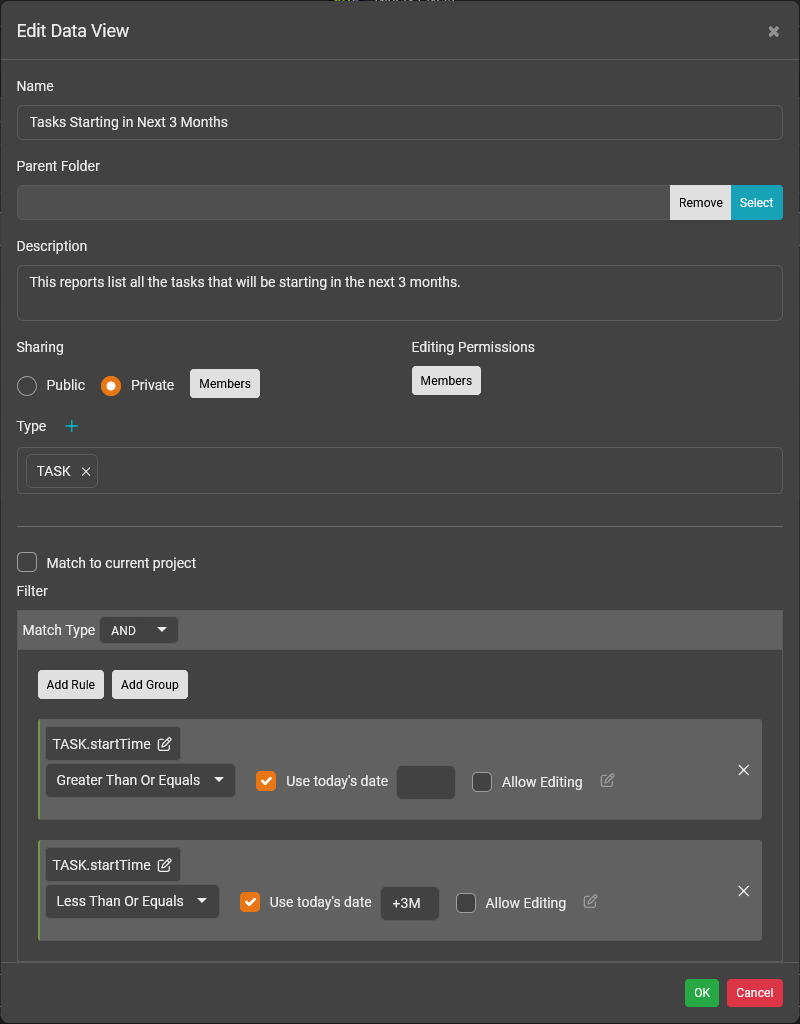
This data view report lists all the tasks that will be starting within the next 3 months. The data view has two rules:
- The task start time must start later than today
- And, the task start time must not start later than today plus 3 months.
The Date Offset value can be a positive value to look into the future. Examples:
- +1Y is 1 year starting from today
- +3M is 3 months starting from today
- +1.5W is 1.5 weeks starting from today
- +4D is 4 days starting from today
- +6h is 6 hours starting from today
- +30m is 30 minutes starting from today
The Date Offset value can be a negative value to look into the past. Examples:
- -1Y is 1 year prior to today
- -3M is 3 months prior to today
- -1.5W is 1.5 weeks prior to today
- -4D is 4 days prior to today
- -6h is 6 hours prior to today
- -30m is 30 minutes prior to today
You can use the following units to specify the date offset time:
- m - minutes. Example: 30m = 30 minutes.
- h - hours. Examples: 6h = 6 hours. 1.5h = 90 minutes.
- D - days. Examples: 10D = 10 days. 3.5D = 3.5 days.
- W - weeks. Examples: 3W = 3 weeks. 6.5W = 6.5 weeks.
- M - months. Example: 2M = 2 months. 1.25M = 1.25 months.
- Y - years. Example: 1Y = 1 year. 2.5Y = 2.5 years.
Was this article helpful?
That’s Great!
Thank you for your feedback
Sorry! We couldn't be helpful
Thank you for your feedback
Feedback sent
We appreciate your effort and will try to fix the article