Timesheet Status values are the status values for timelogs that you can add into Projectal. Examples of timsheet status values are Pending, Approved, Submitted and Rejected.
You can see timesheet status values used in Projectal on the following screens:
- Timelogs screen
- Edit Timelog screen
The Timesheet Status tab on the Lists screen is where you can add, edit, remove and reorder timesheet status values in Projectal.
Getting to the Timesheet Status tab on the Lists screen
- Go to the Management screen by clicking Management on the left sidebar.
- Click the Lists button to display the Lists screen.
- Click the Timesheet Status tab to view the timesheet status values.
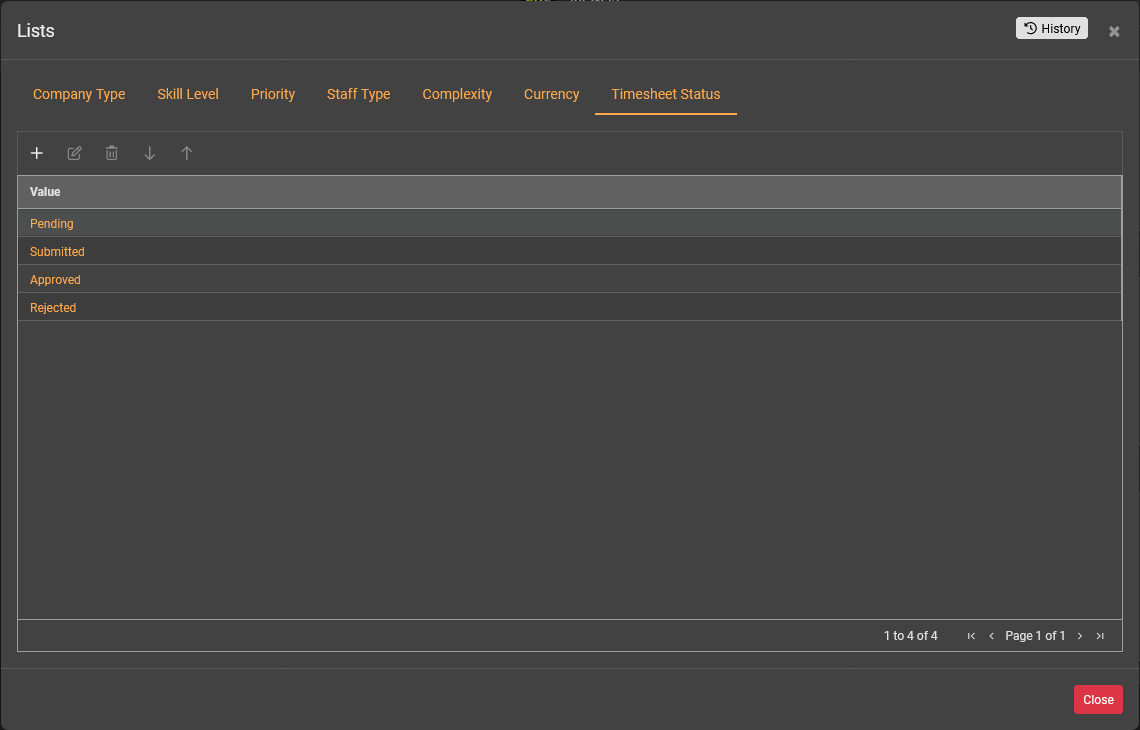
Timesheet Status tab toolbar
The Timesheet Status tab toolbar has the following buttons:
- Add - to add a new status value
- Edit - to edit the selected status value
- Delete - to delete the selected status values
- Move Down - to move the selected status value down in the list
- Move Up - to move the selected status value up in the list
Editing Timesheet Status Values
Double-click on a cell to edit a value for the status.
Select a cell and copy (Ctrl+C) and paste (Ctrl+V) the status value into another cell.
Select a cell and press the DEL key to delete the value from the cell.
Tip: Setting the order of the values is useful since this is the order of the values that will displayed on screens across Projectal. Typically, you may want the default or recommended value to be at the top of the list. Or you may want the list to be ordered A-Z.
Was this article helpful?
That’s Great!
Thank you for your feedback
Sorry! We couldn't be helpful
Thank you for your feedback
Feedback sent
We appreciate your effort and will try to fix the article